
Leaving Luxury Presence, kvCORE or Lofty? Here’s how to migrate your real estate website to a WordPress website you own, without starting your Google rankings over.
You’ve decided it’s time. Maybe you’ve realized the website you’ve been paying for all these years was never actually yours. Maybe the monthly fee keeps climbing, you’re switching brokerages, or your current company isn’t keeping up with AI technology.
Then the worry sets in: what happens to my Google rankings if I move?
It’s the right question to ask. Years of blog posts, neighborhood pages and listing traffic have built search visibility that sends you buyers and sellers every month. Move carelessly and that visibility can drop overnight. Move carefully and you keep it, then keep building on a foundation that finally belongs to you.
The Short Version
A website migration to WordPress doesn’t have to cost you your rankings. Search engines care about four things during a move: your domain, your page addresses (URLs), the redirects between old and new pages, and the content and metadata on each page. Protect all four, reconnect your MLS listings properly, and tell Google about the change, and your search visibility carries forward.
We’ve helped many real estate agents make this move, including Sierra Sotheby’s International Realty agents who left Luxury Presence and Chime/Lofty for WordPress sites they own. This guide walks you through each phase the way we handle it for our clients, so you know what to expect and what to ask of anyone who touches your site.
 Why Agents Are Leaving Proprietary Platforms
Platforms like Luxury Presence, kvCORE and Chime/Lofty made it easy to get a polished site live fast. That convenience comes with a catch most agents don’t notice until they try to leave: on a proprietary platform, you’re leasing your website, not owning it.
That used to be an inconvenience. Today it’s a real business risk, for three reasons.
1. Search visibility is built over years, and it belongs to whoever owns the site. Google rewards websites with a long, stable history: helpful local content, consistent page addresses and pages other sites link to. On a leased platform, the code, design and page structure stay behind when you cancel. Some platforms make it difficult or impossible to export your content cleanly. If the domain was registered by the vendor, even your address may not be yours.
2. AI search raises the stakes. Buyers and sellers now ask ChatGPT, Gemini, Copilot and Google’s AI results questions like “Who’s the best listing agent in Truckee?” Those tools lean on the same long-term signals: a consistent name, address and phone number across the web, a body of genuinely useful local content and a website with real history. We cover how this works in Can AI Recommend You as the Top Agent in Your Market? and Google’s E-E-A-T for Real Estate Websites. Every year you build that authority on a platform you can’t take with you is a year of rent, not equity.
3. Their business decisions become yours. Price increases, feature limits, a support queue you can’t escape and no option to hire your own developer. If the platform is acquired, changes direction or shuts down, your website goes with it. The same is true of a brokerage-provided site, which is why we wrote Switching Brokerages? What Happens to Your Website, Leads and Rankings.
WordPress is different. It’s open source, it powers more of the web than any other platform, and when it’s built for you, the site, the content, the domain and the leads are yours. If your web partner ever stops being the right fit, you take the website with you. For the full case, read Realtor Website Ownership: Critical for Long-Term Success.
Ask your current provider one question: “What happens to my website, my content and my leads if I cancel?” If the answer is “you start over,” you’re renting.
The good news: leaving doesn’t have to mean starting over in Google. Here’s how a careful migration protects what you’ve built.
Phase 1: Take Inventory Before You Cancel Anything
The single most expensive mistake we see is a real estate agent canceling their old platform before the new site is ready. Once the old site goes dark, the record of what Google had indexed goes with it. Phase 1 is about capturing everything first, while you still have access.
Secure ownership of your accounts.
- Your domain. Log in to the registrar yourself and confirm the domain is in your name. If your platform registered it, request the transfer now. This is the one thing you can’t afford to lose.
- Google Search Console and Google Analytics. You want owner access, not “user” access. These accounts hold the history of how people found you.
- Google Business Profile. Confirm you’re the owner, and note the website address it points to.
Record what’s working today.
Don’t worry if this list looks like a lot. When you work with IDXCentral, we pull these reports for you. Your job is simply to give us access to your accounts.
- A complete list of every page on your current site: the home page, community and neighborhood pages, blog posts, featured listings, sold listings, testimonials and landing pages.
- Which of those pages bring in the most search traffic and leads. These are the pages you protect at all costs.
- The keywords you rank for now, so you have a benchmark to measure against after launch.
- Pages other websites link to. Those links carry authority you want to keep.
Export your data. Back up your blog posts, community pages, photos you own, testimonials and your contacts and lead history from the platform’s CRM. Platforms differ in what they let you export, so check this early rather than the week your contract ends.
How we handle it: when an agent comes to us from a proprietary platform, we crawl the existing site before any design work starts. That crawl becomes the master list every later phase is checked against.
Phase 2: Keep Your URLs (Page Addresses) Wherever You Can
Every page on your site has an address, like yourname.com/communities/martis-camp/. Google ranks pages by those addresses. Keep the address the same and the page keeps its history. Change it and Google has to figure out where the page went.
Keep the same domain. This is the foundation. Moving from yourname.com on a platform to yourname.com on WordPress is a change of house, not a change of address. Moving to a brand-new domain is a much bigger reset, so we only recommend it when there’s a strong branding reason.
Match the page addresses you can. WordPress lets us set page addresses however we like, so for your most important pages we rebuild them at exactly the same address. Your top community page, your seller page and your best-performing blog posts should live at the same URL the day you launch.
Accept that some addresses will change, and plan for it. Proprietary platforms often bake their own patterns into addresses, especially for listings and search results. Some of those can’t or shouldn’t be copied exactly. That’s fine, as long as every changed address is covered in Phase 3.
Use the move to clean up. A website migration is a good moment to fix thin or duplicate pages and give your neighborhood pages clear, readable addresses. The rule is simple: improve the structure going forward, but never leave an old address with nowhere to go.
Phase 3: Build a 301 Redirect Map
A 301 redirect is a permanent forwarding address. When someone, or Google, visits an old page address, the redirect sends them straight to the matching new page and tells search engines the move is permanent. Google then passes the old page’s ranking signals to the new one.
Skip this step and every old address that changed becomes a “page not found” error. Visitors bounce, links from other websites break and the rankings attached to those pages fade.
What a redirect map looks like. It’s a simple two-column list: every old address on one side, its best new match on the other.
| Old address (platform) | New address (WordPress) | Why |
|---|---|---|
| /neighborhoods/martis-camp | /communities/martis-camp/ | Same page, new structure |
| /blog/2024/tahoe-market-update | /tahoe-market-update/ | Blog post moved |
| /sellers-guide | /sellers/ | Content combined into a stronger page |
| /property/123-main-st-xyz | /featured-listings/ | Expired listing goes to the closest relevant page |
Example only; your map comes from the Phase 1 inventory.
The rules we follow:
- One-to-one wherever possible. Each old page points to its closest match, not to the home page. Sending everything to the home page is a shortcut that throws away most of the value.
- No chains. Old address goes straight to the final address in one step, not through two or three hops.
- Permanent, not temporary. It has to be a 301 (permanent). A temporary redirect tells Google not to transfer the page’s history.
- Test every line before and after launch. We check that each old address lands where it should.
- Leave them in place. Redirects should stay live for the long term, not be removed after a few months.
One important caveat: redirects only work on a domain you control. If your old site lived on a platform subdomain or a brokerage domain, the owner of that address decides whether redirects are allowed. That’s one more reason Phase 1 starts with owning your domain.
You don’t have to build this yourself. Redirect mapping is one of the most technical parts of a migration, and it’s part of every move we handle. Our team builds, tests and monitors the full redirect map so your old real estate pages keep sending traffic to the new site from day one.
 Phase 4: Carry Over Your Content and Metadata
 Phase 4: Carry Over Your Content and Metadata
Metadata is the behind-the-scenes text that tells Google what each page is about. You may never see it on the page, but it shapes how your site appears in search results. When a migration skips it, pages that ranked well can quietly slip, even with redirects in place.
What we carry over for each important page:
- Page titles. The headline that shows in Google’s results. If Martis Camp Homes for Sale | Tom Jones has been ranking, it moves over word for word unless there’s a clear reason to improve it.
- Meta descriptions. The short summary under the title in search results.
- Headings and on-page text. The words Google read and ranked. We keep the substance, even when the design around it changes.
- Image alt text. Short descriptions of photos, which help accessibility and image search.
- Structured data. Code that tells search engines and AI tools, in plain terms, that you’re a real estate agent with a specific name, office and service area. On WordPress we can add and control this ourselves rather than relying on what a platform decides to include.
- Internal links. The links between your own pages, updated to point at the new addresses directly.
Don’t leave your best content behind. Your blog posts, neighborhood pages, Just Sold Story pages, agent biography and client testimonials are what make you look like the local expert to Google and to AI search. They’re also usually the hardest thing to pull out of a proprietary platform, which is why we move them deliberately rather than hoping an export tool catches everything.
Then keep building. The real payoff of owning your site is that every new real estate blog post and neighborhood page adds to a domain that’s yours for good.
 Phase 5: Reconnect Your MLS Listings (IDX)
 Phase 5: Reconnect Your MLS Listings (IDX)
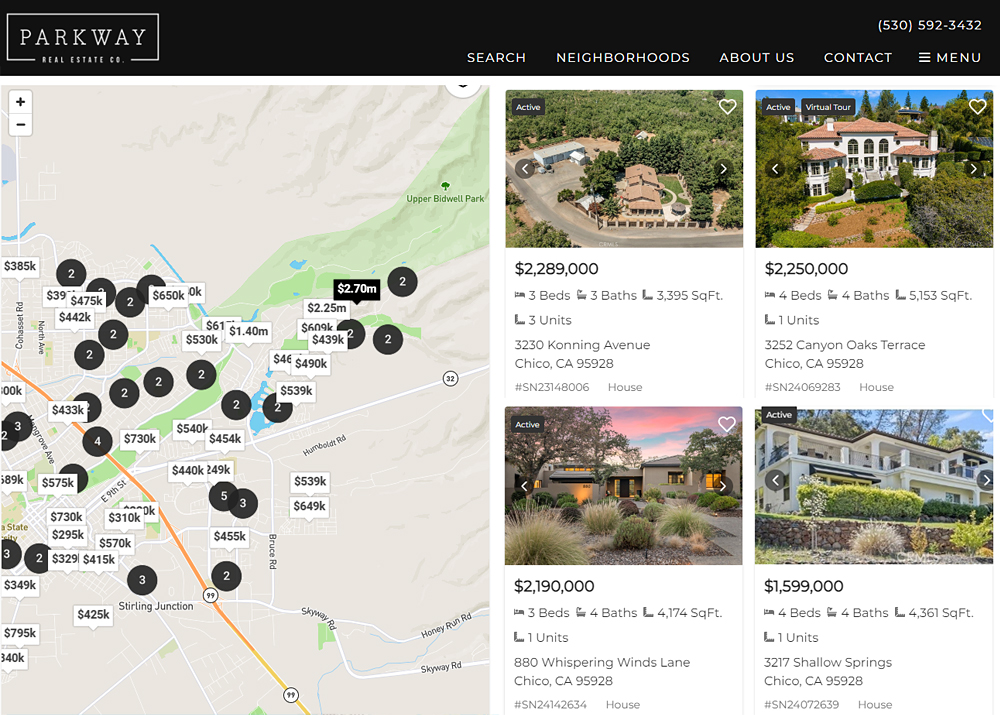
Your IDX is the property search on your website, fed by your MLS. On a proprietary platform it’s bundled in, so most agents have never had to think about it. When you move, it has to be set up fresh, and the timing matters: a site that launches with an empty or broken search loses leads on day one.
Start the paperwork early. IDX access runs through your MLS and your broker, and approvals can take time. We start the IDX setup alongside the design work so listings are live and tested before launch, not scrambled together after.
Choose an IDX that helps your SEO, not just your search bar. Some IDX solutions show listings in a way Google can read and index on your own domain. Others display them in a way search engines largely can’t see. That difference decides whether your listing and community search pages can bring in search traffic of their own. Our guide on How to Choose the Right IDX for Your MLS walks through what to look for.
Rebuild your saved searches and community pages. The listing pages that matter most for SEO are usually your neighborhood and lifestyle searches: lakefront homes, ski-in ski-out, gated communities. We rebuild these as real pages with local content above the listings, then redirect the old platform versions to them.
Keep your leads flowing to an account you control. Connect your IDX registrations, saved searches and listing alerts to a CRM you own, so leads from your new site land with you, not with a vendor.
Check MLS compliance. Each MLS has its own display rules and disclaimers. These have to be in place before launch.
For more on our IDX options, see IDX Solutions for Real Estate Websites.
We coordinate the IDX setup for you. IDX approvals, MLS rules and lead routing vary by market, and we’ve worked with them for years. We handle the paperwork and setup with your MLS and IDX provider, so your listings are live and capturing leads the day your new site launches.
Phase 6: Launch, Resubmit Your Sitemap and Watch Closely
Launch day is when the domain is pointed your new real estate WordPress site and the redirects switch on. Done right, visitors never notice anything but a better website. The work in the following weeks is what confirms Google noticed the right things.
On launch day:
- Point the domain to the new site and confirm the secure (https) version loads everywhere.
- Switch on the redirect map and spot-check the most important old addresses.
- Make sure the new site is open to search engines. A setting left over from the build stage can hide an entire site from Google, and it’s one of the most common migration mistakes.
- Confirm IDX search, contact forms and lead routing all work end to end.
Resubmit your sitemap. A sitemap is a list of every page on your site that you want search engines to find. WordPress generates one automatically. We submit the new sitemap in Google Search Console (and Bing Webmaster Tools, which also feeds some AI tools) so search engines find the new pages quickly instead of waiting to stumble on them.
Update your listings across the web. Your Google Business Profile, Zillow, Realtor.com, social profiles and review sites should all point to the right page with the same name, address and phone number. Consistency here is one of the signals AI search relies on.
Monitor for the first 60 to 90 days. A small, temporary dip in rankings after a migration is normal while Google re-crawls the site. What matters is the trend. We watch Search Console for “page not found” errors and pages that aren’t being indexed, compare rankings against the Phase 1 benchmark and fix any missed redirects quickly.
Keep the site fast and healthy. Speed and reliability help both Google and AI crawlers read your site properly; see Does Better Hosting Help Real Estate SEO and AI Visibility? Our WordPress Care Plans handle updates, security and backups after launch.
 Real Agents, Real Website Migrations to WordPress

We’ve walked many real estate agents through this process. A few recent examples from the Lake Tahoe and Truckee market, all with Sierra Sotheby’s International Realty:
| Agent | Moved from | Their WordPress site today |
|---|---|---|
| Samantha Swigard | Luxury Presence | TahoeLakeAndSkiProperties.com |
| Abarta-Biebl Group | Chime/Lofty | Tahoe-TruckeeRealEstate.com |
| Camille Duvall | Luxury Presence | CamilleDuvallSellsTahoe.com |
| Michelle Seeley | Luxury Presence | TahoeLifeRealEstate.com |
Each kept their own domain and now owns the website outright. Look at what they’re building on that foundation:
- Samantha Swigard has community pages for Martis Camp, Lahontan, Northstar and North Shore Lake Tahoe, lifestyle pages for ski-in ski-out, lakefront and gated communities, and a blog with local guides and Just Sold stories. Every one of those pages adds to a domain she controls. In her words: “Like many agents, I was enticed by the Luxury Presence promise when it was promoted by several brokerages—but quickly realized that bigger isn’t always better. I returned to Moineau at the first opportunity and couldn’t be happier.” Read Samantha’s full testimonial
- Camille Duvall publishes a steady stream of monthly Tahoe market updates and local commentary on her blog, alongside neighborhood pages from Truckee to the Lost Sierra and lifestyle searches for lakefront, ski resort, golf course and acreage properties. That’s a body of fresh, expert local content building authority on her own site, month after month.
- Michelle Seeley built out lifestyle searches for lakefront, golf course and ski resort homes across California and Nevada, plus a short-term rental resource, exactly the kind of specific local content buyers and AI search tools look for.
- The Abarta-Biebl Group brought their team’s neighborhood pages, market reports, testimonials and a local service directory onto a site the team owns, instead of one tied to a CRM subscription.
None of them had to manage the redirects, metadata or IDX reconnection on their own. That technical handoff happened alongside the new design, so they could keep selling while we handled the move.
Do It Yourself, or Bring in a Website Migration Partner?
You can do parts of this yourself, and the checklist below will help. But a migration has a lot of moving parts that have to land on the same day: domain, redirects, metadata, IDX approval, lead routing and search engine settings. Miss one and the cost shows up weeks later as lost rankings and missed leads.
That’s why most agents leaving a proprietary platform hand the technical side to a partner who builds the new site and owns the SEO handoff, rather than a designer who builds a pretty site and leaves the redirects to chance.
This is what we do at IDXCentral. We have been in business 30+ and during that time helped agents from all over the U. S. migrate to a WordPress real estate websites with IDX, away from proprietary platforms like Luxury Presence, kvCORE and Chime/Lofty . You get:
- A review of what you have today: your site, domain, accounts and the pages worth protecting.
- A custom WordPress website you own, designed around your brand, with IDX and a CRM that keep your leads in your hands.
- The SEO handoff, done for you: URL preservation, the 301 redirect map, metadata migration, sitemap submission and post-launch monitoring.
- A small U.S.-based team that answers the phone, before and after launch.
Your SEO-Safe Website Migration Checklist
- Domain registered in your name
- Owner access to Google Search Console, Analytics and Business Profile
- Full list of current pages, top traffic pages and current rankings
- Blog posts, community pages, photos, testimonials and contacts exported
- Important page addresses matched on the new site
- 301 redirect map built and tested for every changed address
- Page titles, descriptions, headings and structured data carried over
- IDX approved, connected, indexable and MLS-compliant
- Leads routing to a CRM you own
- Site open to search engines; sitemap submitted to Google and Bing
- Name, address and phone updated consistently across the web
- Old platform canceled only after the new site is live and verified
- Rankings and errors monitored for 60 to 90 days
Frequently Asked Questions
Will I lose my Google rankings when I leave Luxury Presence, kvCORE or Lofty?
Not if you keep your domain, preserve or redirect every page address and carry over your content and metadata. A short, small dip while Google re-crawls is normal; a lasting drop usually means something was missed.
Can I keep my domain name when migrating my website?
Yes, if it’s registered in your name. If your platform registered it for you, request the transfer before you cancel.
How long does an SEO-safe website migration take?
It depends on the size of your site and how quickly your MLS approves IDX. Starting the IDX setup early is the best way to keep the timeline tight.
What happens to the leads and contacts my current website has captured?
On platforms like Luxury Presence, kvCORE and Lofty, the buyers who registered on your property search, signed up for new listing alerts or requested a home valuation are stored in the platform’s CRM, not on your website. Before you cancel, export them with their notes, tags and saved search criteria, and check your brokerage agreement for any leads your brokerage paid for. On your new WordPress site, we connect IDX registrations, listing alerts and valuation requests to a CRM you own and help you re-create active buyers’ saved searches, so they keep getting listing emails without missing a beat.
Ready to Own Your Website?
If you’re ready to leave a proprietary platform without giving up the rankings you’ve earned, let’s talk. We’ll look at your current site and map out the simplest, safest path to a WordPress website that belongs to you.
Call (530) 577-8027 or contact us for a free consultation, and browse our portfolio to see recent work.