
 Receiving email leads through your website’s “Contact” form and “What’s My Home Worth” form via the Gravity Forms Plugin may not be functioning correctly, due to recent changes made by some email providers! Please continue reading for more information on this issue and how to resolve it.
We have noticed that many popular email providers (Yahoo, AOL, etc.) have made changes to their policies due to an overabundance of spam. This policy change may be preventing some of the leads coming through select forms on your website, such as the “Contact” and “What’s My Home Worth” form. The new policy that some email providers have adopted basically prevents anyone from sending email to you when the “FROM” address is set to the email address used by the visitor. For example – if joe@yahoo.com fills out your form, it has been a common practice to set the FROM address to joe@yahoo.com. Even though the visitor Joe (joe@yahoo.com) is sending you the message, technically it is our server sending the form submission to you, and not Yahoo. Yahoo has a policy that if the message is addressed FROM someone@yahoo.com the message must come from a Yahoo mail server. If not, then it should be rejected and considered spam.
Does This Effect You?
To determine if this issue could affect you, login to your WordPress dashboard > click Forms > place your mouse over the form you wish to check (you should check all your forms) > Settings > click Notifications. Here you should see Admin Notifications or Main Notifications. Place your mouse over the one you see and click Edit. If the From Email is set to {admin_email} or something else, you are probably ok, but it is highly recommended that you test your forms (see below).
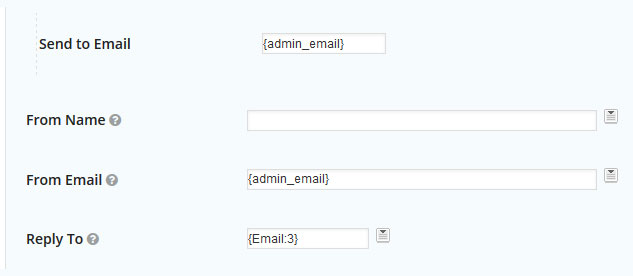
From Email: This should either be set to {admin_email} OR your email address, i.e. info@mydomain.com
Reply To: Should be set to something like, {Email:3}. You can get that code by clicking the icon to the right of the field and selecting Email.
When updated correctly your form should look something like this:
ALL other fields should be left alone unless you know what you are doing!
Once you have changed these settings, simply scroll to the bottom of the page and click on “Update Notification” to save the changes.
Go ahead and test your form after changes have been made to ensure that you are receiving your leads. Repeat these same steps for your “What’s My Home Worth” form or any other additional forms that you have created on your site.
Test Your Forms
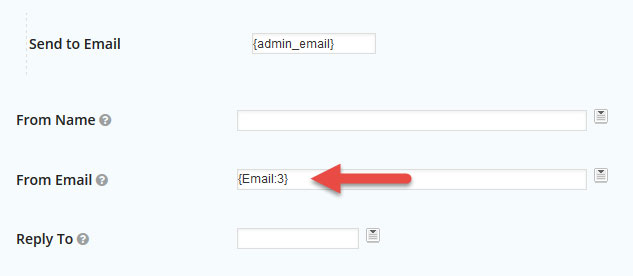
Take a moment to visit your website, fill out the form and make sure you get the lead. If the “From Email” address is set to {Email: 3}, the number “3” may vary, you will want to make some changes.
Again, if you are unsure of this process and need assistance, please contact us at support.
